
If I told you I write about the best productivity Chrome extensions for a living, you'd probably picture someone with a color-coded calendar and a permanent inbox zero. The truth is closer to the opposite. I have ADHD. Not the dramatic kind, but bad enough that I lose my keys on a weekly basis, I've let my phone battery hit zero more times this month than I'd like to admit, and the second I sit down to focus, some gremlin in my head opens four new tabs I never asked for.
So my "expertise" isn't really expertise. It's survival. Over the last few years I've installed, rage-uninstalled, and reinstalled basically every productivity extension Chrome has to offer, all in an effort to wrangle a brain that, left alone, would rather juggle flaming chainsaws than think in a straight line.
This is the list of what actually survived. Eight productivity Chrome extensions that earned a permanent spot on my toolbar in 2026, what each one is genuinely good at, and where the free tools quietly beat the paid ones.
One disclosure before we start: I built one of these (Focora). It sits at number two on the list, it gets the same honest pros and cons as everything else, and I'll tell you exactly where it falls short. You can judge for yourself.
TL;DR
Short version, if you're skimming:
| If you want... | Best pick | Why it stands out |
|---|---|---|
| The famous, polished site blocker | BlockSite | Huge user base, blocks sites, keywords, and categories, and runs on mobile too |
| Unlimited site blocking for free, plus a view of where your time actually goes | Focora | No 3-site cap, no subscription, and it shows you which sites drain your day |
| A hard lockout you genuinely cannot undo | StayFocusd | Nuclear Option locks you out with no escape hatch |
| Fast, reliable task capture | Todoist | Quick-add from any page, natural-language dates, syncs everywhere |
| Billable time tracking | Clockify | One-click timer, clean client reports |
| Dark mode on every website | Dark Reader | Automatic, free, adjustable per site |
| A calmer new tab | Momentum | One photo, one daily intention |
| Background sound for deep work | Noisli | Sixteen mixable sounds |
Now the full breakdown.
1. BlockSite: Best for Simple, Popular Site Blocking
Price: Free for up to 3 sites, then a paid plan · Rating: 4.4/5
If you ask r/productivity for a site blocker, BlockSite is the name that comes up most. It has over five million users, a clean interface, and it does the core job well: add a distracting site to your block list and it's gone. You can block by full URL, by keyword, or by whole category like social media, news, or adult content, and you can put it all on a schedule so the block only runs during work hours. There's a Focus Mode with a built-in Pomodoro timer, and because it ships real mobile apps, it can follow you onto your phone, which most extensions simply can't.
So far so good. Here's the catch the store listing doesn't lead with.
Pros:
- Polished, beginner-friendly, and popular for a reason
- Blocks by site, keyword, or category, with scheduling
- Focus Mode and a Pomodoro timer built in
- Real Android and iOS apps, so blocking can extend past the browser
Cons:
- The free plan only lets you block around three sites, which is closer to a trial than a real setup. Actual day-to-day blocking lives behind a paid subscription.
- It shows ads and asks for a fair amount of permissions, and some features want you logged into a Google account so it can read your history.
- It tells you that you visited a site. It doesn't tell you when in your day it happened, or how much the detour actually cost you.
Best for: People who want the well-known, polished blocker, need it on mobile too, and don't mind paying once they outgrow the free tier.
2. Focora: Best for Free Unlimited Blocking (and Seeing Where Your Time Goes)
Price: Free · Install Focora →
This is the one I built, so take the placement with a grain of salt. I put it at number two on purpose, because the honest pitch is narrow: if all you want is to block distracting sites, Focora does that for free, with no three-site cap and no subscription. That alone is the reason it exists. I got tired of hitting a paywall on a blocker, for something that should obviously be free.
You block a site the same easy way you would anywhere else. Hit "Block This Site" in the popup, or paste a URL. Block as many as you want. Nothing is gated.
The part I'm actually proud of is what happens next. Focora also watches which sites you spend time on and sorts them automatically using a dataset of a few thousand site types, so instead of guessing which sites to block, you can look at a week of your own browsing and see exactly where the hours went. Blocking based on data beats blocking based on vibes. For a brain like mine, seeing "you spent four hours on YouTube this week and three of them weren't tutorials" does more than any motivational quote ever has.
It also folds your Pomodoro timer and your task list into the same extension, so you're not the person with five separate productivity tools open who is, somehow, getting nothing done. When a focus block ends you get a Chrome notification and an optional sound, so you can stop clock-watching.
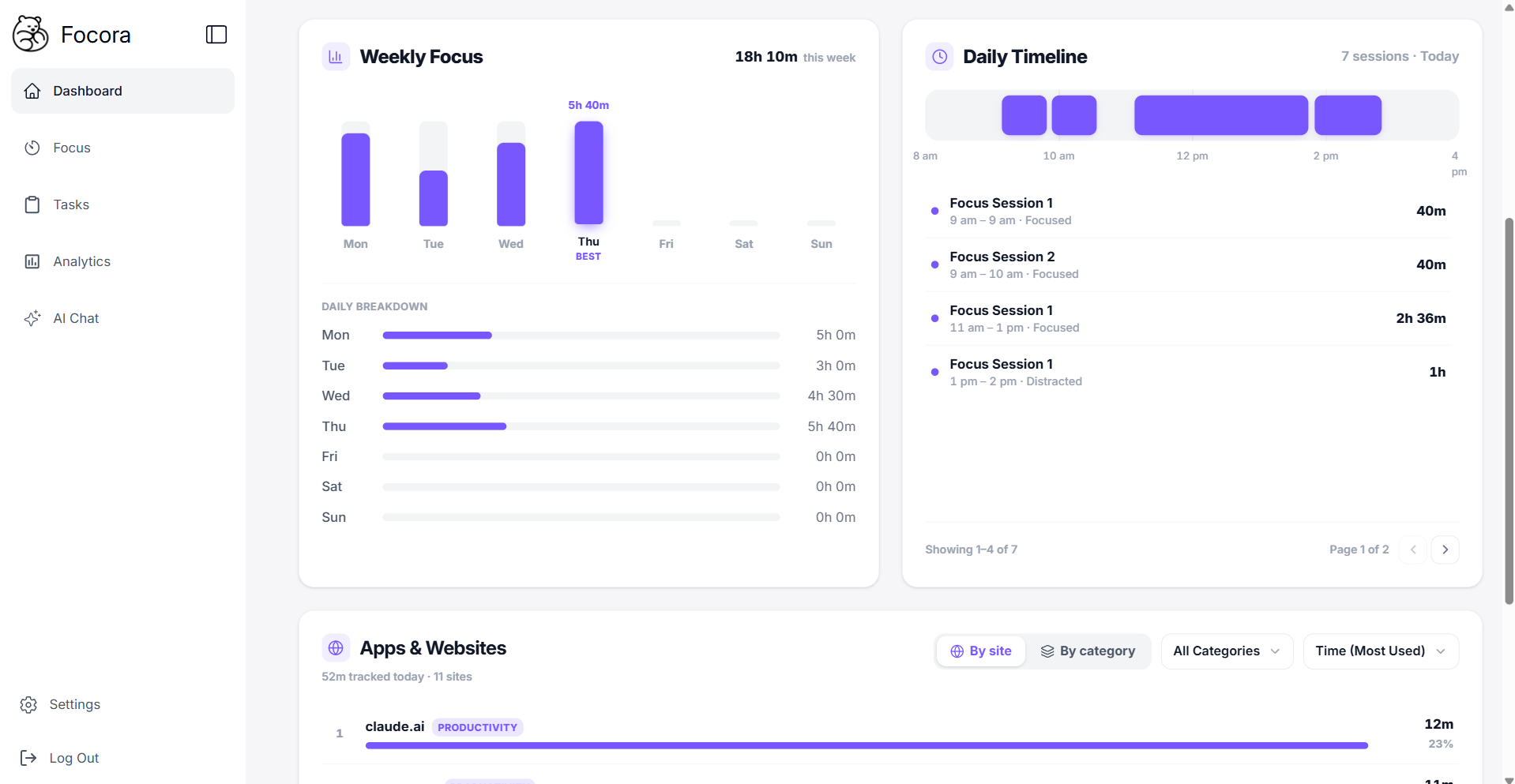
And if you ever want to go deeper, there's a whole analytics layer waiting: a daily timeline of your focus and breaks, session quality ratings, a measure of how long you really take to get back to work after a distraction, and an AI you can ask things like "what was different about my best week last month?" None of it is in your face. It sits in a tab you can open when you're curious and ignore when you just want to block Reddit and get on with your day.
Pros:
- Unlimited site blocking, free, with no three-site cap and no subscription
- Shows you which sites actually eat your time, sorted automatically, so you block with data instead of guesses
- Pomodoro timer, tasks, and blocking in one extension, so you can finally close the other four
- A deeper analytics layer (timeline, focus quality, recovery time, AI analysis) that's there when you want it
Cons:
- It does more than a one-tap blocker, so there's slightly more to it. The analytics only get interesting after a few days of real use, once it has enough data to show you something.
- It's a newer, smaller tool than the giants on this list, so the community and integrations aren't as big yet.
Best for: Anyone who wants real, free site blocking and likes the idea of seeing where their attention actually goes, without paying for the privilege.
3. StayFocusd: Best for a Hard Lockout
Price: Free · Rating: 4.5/5
I've tried most website blockers, and StayFocusd is the one that actually holds when I'm desperate. You give each distracting site a daily time budget. When the clock runs out, you're locked out for the rest of the day. No override, no "just five more minutes." The Nuclear Option goes further: flip it on and your entire block list goes dark until the timer expires, with no way to turn it back off. It sounds terrifying. On a deadline, it's exactly what some of us need.
Pros:
- Genuinely hard limits, including a lockout you cannot undo
- Free, with no real upsell
- Simple to set up for sites you've already decided are the problem
Cons:
- Same blind spot as most blockers: it knows you visited a site, not what triggered it or how long the recovery cost you
- The all-or-nothing lockout is too aggressive for everyday use
Best for: People who need a brutal external limit during crunch time and don't trust their own willpower to hold the line.
4. Todoist: Best for Simple Task Capture
Price: Free (Pro around $5/month) · Rating: 4.5/5
Todoist is the task manager I recommend to anyone who wants something reliable without adopting a whole philosophy. The quick-add shortcut works from any page, the natural-language date parsing ("every Wednesday at 10am") is genuinely good, and it syncs across every device with zero setup.
Pros:
- Fast capture from anywhere in the browser
- Natural-language dates and recurring tasks that just work
- Syncs cleanly across devices and teams
Cons:
- Tasks live in isolation. It knows you made a task and checked it off, not whether you actually worked on it or how many times you quietly moved the deadline.
Best for: People who want clean, fast task capture and nothing heavier.
5. Clockify: Best for Billable Time Tracking
Price: Free (paid plans from around $4/month) · Rating: 4.4/5
If you freelance or consult, Clockify is the cleanest billable time tracker I've used. One click to start, one click to stop, tag time by project and client, and export a report at the end of the week that a client can actually read. The built-in Pomodoro mode is a nice bonus if you want structured blocks without running a second timer.
Pros:
- Dead-simple start and stop time tracking
- Clean, client-ready reports
- Optional Pomodoro mode built in
Cons:
- It tracks hours, not quality. Three logged hours could be your best work of the week or your worst, and Clockify can't tell the difference.
Best for: Freelancers and consultants who need accurate billable records.
6. Dark Reader: Best for Night Work
Price: Free, open source · Rating: 4.7/5
If you work past sunset, or notice your eyes getting gritty by mid-afternoon, Dark Reader is close to non-negotiable. It applies a dark theme to every website automatically, even ones that never built their own. You can tune brightness, contrast, and warmth per site, whitelist anything that looks broken, and then forget it's running.
Pros:
- Automatic dark mode on basically every site
- Per-site brightness, contrast, and warmth controls
- Free and open source
Cons:
- A handful of sites render oddly and need whitelisting, but that's a thirty-second fix.
Best for: Anyone who works evenings, or whose focus dips in the second half of the day.
7. Momentum: Best for Starting With Intention
Price: Free (Plus around $5/month) · Rating: 4.5/5
Every time you open a new tab, Momentum swaps Chrome's default for a full-screen photo, the time, and one question: what is your main focus today? It doesn't track or block anything. It just asks, every tab, until naming your priority becomes a reflex instead of something you skip. It works better than it sounds, especially first thing in the morning before you've opened anything else.
Pros:
- A calm, distraction-free new tab
- A daily intention prompt that quietly builds a habit
- Zero configuration
Cons:
- It's a nudge, not a system. Once you've typed your intention, the rest is on you.
Best for: People who want a low-friction way to stay anchored to what matters each day. (For my fellow new-tab addicts, this one helps more than you'd expect.)
8. Noisli: Best for Deep Work Soundscapes
Price: Free (Pro around $10/month) · Rating: 4.6/5
Your environment shapes your focus more than most people give it credit for. Noisli gives you sixteen background sounds (rain, thunderstorm, coffee shop, white noise, ocean, forest) and lets you layer them into a mix you can save and reopen every session. Used consistently, the same mix becomes a cue: start it, and your brain learns that this sound means it's time to work.
Pros:
- Sixteen mixable, saveable soundscapes
- A consistent audio cue you can train yourself on
- Runs in the background while you do everything else
Cons:
- If silence already works for you, this solves a problem you don't have.
Best for: Remote workers, café regulars, and anyone whose physical space is too noisy or too quiet to focus in.
A Setup That Actually Works
None of these were built to work together, but they stack well with a little intention. You don't need all eight. A realistic starting kit:
- Pick one blocker. If you want the famous, polished option and don't mind paying once you outgrow the free tier, use BlockSite. If you want unlimited blocking for free plus a view of where your time goes, use Focora.
- Add Dark Reader if you work evenings or your eyes are tired by 3pm.
- Turn on Momentum so every new tab starts with one intention instead of a reflex search.
- Add Noisli if your space is too loud or too quiet, and reuse one sound mix to build the association.
- Keep StayFocusd in your back pocket for deadline days when you need a lockout you can't talk your way out of.
The order that matters most: see where your attention actually goes before you start building fences. It's a lot easier to block the right sites once you know which ones are the real problem.
The Thing Most People Get Wrong
Here's the honest part.
At the end of the day, tools are just tools. A Chrome extension isn't going to do the work for you, write your code, or study for your exam. The point of a productivity setup isn't to optimize every second of your day. It's to remove enough friction that you can actually sit down and start.
If your brain works anything like mine, the right tool won't fix you. It just shrinks the gap between "I should be working" and "I'm working," and on a bad day that gap is the whole battle. So pick the few tools that give you clarity, delete the ones that just hand you more dashboards to manage, and go do the thing.
Key Takeaway
The best productivity setup isn't the one with the most extensions. It's the smallest one that gets out of your way and lets you work.
Focora is free, blocks as many sites as you want, and shows you where your time actually goes. If your toolbar looks anything like mine used to, give it a week. Install the Chrome extension →